
5/15/15
Hướng dẫn xem ID Facebook

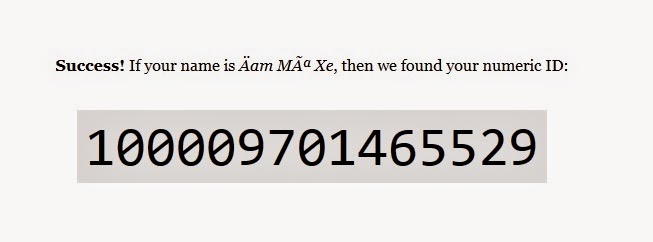
Bạn copy link facebook bạn cần tìm ID, sau đó truy cập vào địa chỉ Tại đây và dán đường link facebook đó vào ô Enter your personal Facebook profile URL sau đó nhấn Lookup numeric ID… như hình dưới:

Kết quả sẽ hiển thị trong giây lát:
Hãy comments và chia sẻ nếu bạn thấy bài viết hay nhé! ktvonline24.blogspot.com
Read More »
Labels:
thủ thuật internet
5/14/15
Recent Comments đơn giản với text trên blogspot

- Bài viết hướng dẫn bạn tạo Recent Comments đơn giản với text + số lần comments trên blog của bạn.
1 . Đăng nhập vào Blogger - Bố cục - Thêm tiện ích - HMTL/Javascript
2. Copy đoạn code bên dưới vào:
<style>
.commentbubble {
background: #292D30;
width: 49px;
float: left;
margin: 2px 20px 35px 0px;
font-weight: bold;
font-size: 1.3em;
text-align: right;
font-family: georgia,Helvetica;
padding: 0px 0px 5px 0px;
text-align: right;
color: #FFF;
text-shadow: 4px 1px #202022;
position: relative;
top: 5px;
}
.commentbubble:after {
content: ' ';
position: absolute;
width: 0;
height: 0;
right: 0px;
top: 100%;
border-width: 5px 8px;
border-style: solid;
border-color: #292D30 #292D30 rgba(0, 0, 0, 0) rgba(0, 0, 0, 0);
top: 34px;
right: 6px;
}
</style>
<script type="text/javascript">
function getYpipePP(feed) {
document.write('<ul style="list-style:none; ">');
var i;
for (i = 0; i < feed.count ; i++)
{
var href = "'" + feed.value.items[i].link + "'";
var pTitle = feed.value.items[i].title;
var pComment = + feed.value.items[i].commentcount;
var pList = '<li style="clear:both; padding:10px 0px 30px 0px!important; border-bottom: 1px dashed #dedede; line-height:2em; "> <div class="commentbubble">' +pComment + "  </div>" + "<a href="+ href + '" target="_blank">' + pTitle ;
document.write(pList);
//to remove comment count delete this line
document.write('</a></li>');
}
document.write('</ul>');
}
</script>
<script src="http://pipes.yahoo.com/pipes/pipe.run?
YourBlogUrl=http://ktvonline24.blogspot.com
&ShowHowMany=5
&_id=390e906036f48772b2ed4b5d837af4cd
&_callback=getYpipePP
&_render=json"
type="text/javascript"></script>
3. Thay dòng màu đỏ thành địa chỉ Blog của bạn.
4. Save lại và xem kết quả.
Hãy comments và chia sẻ nếu bạn thấy bài viết hay nhé! ktvonline24.blogspot.com
Read More »
Labels:
Thủ Thuật Blogger
5/13/15
How to Restore the Real Internet Explorer Desktop Icon in Windows 7

If you just want the IE icon back, all you need to do is download the RealInternetExplorerIcon.zip file, extract the contents, and then double-click on the w7_ie_icon_restore.reg file. That’s all you have to do.
There’s also an undo registry file there if you want to get rid of it.

http://cdn5.howtogeek.com/wp-content/uploads/gg/up/RealInternetExplorerIcon.zipHãy comments và chia sẻ nếu bạn thấy bài viết hay nhé! ktvonline24.blogspot.com
Read More »
Labels:
Thủ Thuật Windows
Thêm hiệu ứng bóng đổ bo quanh khu vực nội dung bài viết trên blogspot

1.Đăng nhập vào Blogger - Mẫu - Chỉnh sửa HTML.Tìm đoạn code sau:
.post {
2. Thêm code này vào :
- Thay đổi các thông số theo ý thích của bạn.margin:0030px0;
padding-top:10px;padding-bottom:10px;padding-right:10px;padding-left:10px;border:1pxsolid#B2B300;border-radius:10px;-moz-border-radius:10px;-webkit-border-radius:10px;-moz-box-shadow:5px5px5px#FFFF00;-web-kit-box-shadow:5px5px5px#FFFF00;-goog-ms-box-shadow:5px5px5px#FFFF00;box-shadow:5px5px5px#FFFF00;
3. Save lại và xem thành quả.
Hãy comments và chia sẻ nếu bạn thấy bài viết hay nhé! ktvonline24.blogspot.com
Read More »
Labels:
Thủ Thuật Blogger
Easy Sysprep v4 721 đa ngôn ngữ ( beta)

Easy Sysprep v4 721 đa ngôn ngữ phiên bản beta.
tên viết tắt: EasySysprep4_721_multi
phiên bản: 4.0.16.391
ngôn ngữ hổ trợ: Việt nam, tiếng anh, tiếng trung quốc
Description: Easy Sysprep v4 721 Multi Languages
ProductName: EasySysprep4_721_multi
Version: 4.0.16.391
Languages: Vietnamese, English, Chinese
IT Developer: DanielDac™
Developers Tools: DanielDac™ Version
CompanyName: 721PC-Net Corporation
Download Easy Sysprep v4 721 đa ngôn ngữ ( beta)
Hãy comments và chia sẻ nếu bạn thấy bài viết hay nhé! ktvonline24.blogspot.com
Read More »
Labels:
phần mềm
Tạo bài viết liên quan với hình ảnh bo tròn kiểu xoay trong blogspot

1. Đăng nhập vào Blogger - Mẫu - Chỉnh sửa HTML.
2. Tìm code:
</head>Copy đoạn code bên dưới vào phía trên nó:
<script type='text/javascript'>Tiếp tục thêm code này vào phía trên </head>
//<![CDATA[
var relatedTitles = new Array();
var relatedUrls = new Array();
var relatedpSummary = new Array();
var relatedThumb = new Array();
var relatedTitlesNum = 0;
var relatedPostsNum = 4; // number of entries to be shown
var relatedmaxnum = 75; // the number of characters of summary
var relatednoimage = "https://blogger.googleusercontent.com/img/b/R29vZ2xl/AVvXsEgebo1ZjOBt4AF1bAurAgo2iYt3_OCsEnO71fgJqQwWiG_Q9-NubJFFAxNUieg0emJFgdvVG25hBKsNfh1tGF0Q-x8tpMSJFupj4MibEw74wObq9PvoqEraGjvIEo4jBMgT4PjzcVFiaLCm/s1600/no_image.jpg"; // default picture for entries with no image
//]]>
</script>
<script src="http://helplogger.googlecode.com/svn/trunk/related-posts-with-thumbs-and-summaries.js" />
<style>
.relatedsumposts {
float: left;
padding: 0px 10px;
overflow: hidden;
text-align: center;
/* width and height of the related posts area */
width: 120px;
height: 200px;
border-right: 1px solid #E5E5E5;
display: inline-block;
}
.relatedsumposts:hover {
background-color: #F7F7F7;
}
.relatedsumposts img:hover {
-webkit-transform: rotate(360deg);
-moz-transform: rotate(360deg);
-o-transform: rotate(360deg);
}
.relatedsumposts a {
/* link properties */
color: #linkcolor;
display: inline;
font-size: 10px;
line-height: 1;
}
.relatedsumposts img {
/* thumbnail properties */
margin-top: 2px;
height: 82px;
padding: 5px;
width: 82px;
border: 1px solid #fff;
-webkit-border-radius: 100px;
-moz-border-radius: 100px;
border-radius: 100px;
-webkit-box-shadow: 0 1px 2px rgba(0, 0, 0, .4);
-moz-box-shadow: 0 1px 2px rgba(0, 0, 0, .4);
box-shadow: 0 1px 2px rgba(0, 0, 0, .4);
-webkit-transition-duration: 0.8s;
-moz-transition-duration: 0.8s;
-o-transition-duration: 0.8s;
transition-duration: 0.8s;
-webkit-transition-property: -webkit-transform;
-moz-transition-property: -moz-transform;
-o-transition-property: -o-transform;
transition-property: transform;
overflow: hidden;
}
.relatedsumposts h6 {
/* title properties */
display: table-cell;
height: 3em;
margin: 5px 0 0;
overflow: hidden;
padding-bottom: 2px;
vertical-align: middle;
width: 130px;
}
.relatedsumposts p {
/* summary properties */
border-top: 1px solid #E5E5E5;
border-bottom: 1px solid #E5E5E5;
color: #summarycolor;
font-size: 10px;
height: 4em;
line-height: 1;
margin: 5px 0 0;
overflow: hidden;
padding: 5px 0 15px 0;
text-align: left;
}
#relatedpostssum {
background: #F3F3F3;
height: 200px; /* related posts container */
padding: 5px;
width: 100%;
}
.relatedpoststitle {
font-size: 19px;
font-weight: bold;
border-top: 3px solid #FB8227;
color: #777;
display: inline-block;
padding: 5px 10px;
width: 190px;
float: left;
margin: 0px -200px 0px 20px;
transform: rotate(90deg);
transform-origin: left top 0;
-ms-transform: rotate(90deg);
-ms-transform-origin:left top 0;
-webkit-transform: rotate(90deg);
-webkit-transform-origin:left top 0;
font-family: Gill Sans / Gill Sans MT, sans-serif;
}
</style>
3. Tìm code này:
<a expr:href='data:label.url' rel='tag'><data:label.name/></a><b:if cond='data:label.isLast != "true"'>,</b:if>Và thêm code sau vào dưới nó
<b:if cond='data:blog.pageType == "item"'>4. Tiếp tục tìm code sau:
<script expr:src='"/feeds/posts/default/-/" + data:label.name + "?alt=json-in-script&callback=readpostlabels&max-results=50"' type='text/javascript'/>
</b:if>
</b:includable>- Click mở rộng code ra như hình:
<b:includable id='postQuickEdit' var='post'>

<b:if cond='data:blog.pageType == "item"'>
<div class='post-footer-line post-footer-line-4'>
<div class='relatedpoststitle'>RELATED POSTS</div>
<div id='relatedpostssum'>
<script type='text/javascript'>showrelated();</script>
</div>
<div style='clear:both;'/>
</div>
</b:if>

5. Save lại và xem kết quả.
Chú ý: Các hình ảnh bài viết trên blog của bạn phải do tự bạn upload lên blog nó sẽ không thể hiển thị image từ trang khác không tin cậy.
Hãy comments và chia sẻ nếu bạn thấy bài viết hay nhé! ktvonline24.blogspot.com
Read More »
Labels:
Thủ Thuật Blogger
Hướng dẫn xóa chữ "Showing post with lable....show all posts" khi Search blogspot

Khi bạn vào mục tìm kiếm trên blogspot sau khi gõ từ khóa tìm kiếm nó sẽ cho ra kết quả và phía trên nó sẽ hiện thêm chi tiết như hình.Bài viết này sẽ hướng dẫn các bạn xóa dòng chữ như trong hình đi.
1.Đăng nhập vào Blogger - Mẫu - Chỉnh sửa HTML và tìm code sau:
<b:includable id='status-message'>Chú ý; để cho an toàn sau khi bạn tìm thấy code này bạn nhìn phía trước nó có cái hình tam giác màu đen bạn click vào nó để mở rộng code ra.Sau đó bạn xóa toàn bộ code bên trong nó bao gồm 2 thẻ mở và đóng code là
<includable> code trong này </includable>2. Sau khi xóa xong bạn copy code bên dưới vào để thay thế:
<b:includable id='status-message'>3.Lưu lại và xem kết quả.
<b:if cond='data:navMessage'>
<div>
</div>
<div style='clear: both;'/>
</b:if>
</b:includable>
Hãy comments và chia sẻ nếu bạn thấy bài viết hay nhé! ktvonline24.blogspot.com
Read More »
Labels:
Thủ Thuật Blogger
5/12/15
Recent comments bài viết với image bo tròn cho blogspot

1.Đăng nhập vào Blogger - Bốc cục - Thêm tiện ích chọn HTML/javascript dán đoạn code bên dưới vào:
Read More »
Labels:
Thủ Thuật Blogger
Shortnotes Template Blogspot

http://z4.ifrm.com/30088/174/0/p1167726/shortnotes.rarHãy comments và chia sẻ nếu bạn thấy bài viết hay nhé! ktvonline24.blogspot.com
Read More »
Labels:
Template Free
5 Amazing Blockquote Blogspot đẹp trang trí cho blog của bạn
Whenever I put hacks codes for the blogger who used the blockquote function are the quotes that appear when you post something you want to ENHANCE your post.Porém in when he wrote that he wanted to highlight something in the posts were featured on the same hacks. So I decided to differentiate the citations codes hacks using a very simple feature that can be embedded in your post during its creation, it is this box of code that you see when you post the codes. (I'm still updating older posts putting the boxes to the codes).
Read More »
Labels:
Thủ Thuật Blogger
Subscribe to:
Comments (Atom)


